
Hey there! I’m Jared Newman, and this is Cord Cutter Weekly, my newsletter on how to save money on TV and make the most of streaming. Sign up here if someone shared this newsletter with you.
Why I avoid subscriptions through Roku and Amazon
 Jared Newman |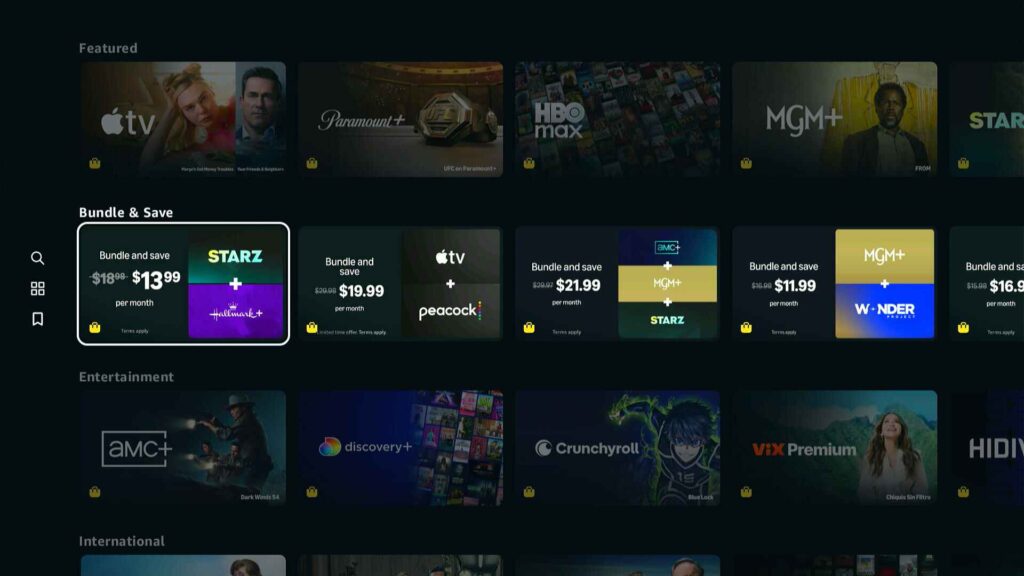
There are too many ways to pay for TV, and some are better than others.
Roku, Amazon, and YouTube increasingly want you to sign up for streaming through their respective subscription marketplaces, rather than the streaming services’ own websites or mobile apps. The pitch is that they’ll consolidate more of your subscriptions in one place, so you’ll have fewer streaming menus and billing systems to deal with.
Alluring as that may be, these third-party subscription marketplaces may cost you more and come with frustrating access restrictions. They also create more confusion around which company’s in charge of your subscriptions. When I’m signing up for streaming, I almost always avoid these marketplaces and just subscribe directly through the streamers’ websites instead.
Weekly rewind
Hulu’s timeline: As I mentioned a couple weeks ago, Disney has no publicly-stated plans to shut down the Hulu app or discontinue Hulu as a standalone service, even as it tries to port the entire Hulu experience into Disney+. But over at Business Insider, James Faris offers some clues on what to expect next.
Citing internal documents, Faris says Disney hopes to get all of Hulu’s content and features into Disney+ by year-end. Meanwhile, one source says Hulu’s app is already “on life support … with no active development,” which can mean longer waits for bug fixes.
Again, that doesn’t mean Hulu is going away as a standalone subscription, and the app isn’t going anywhere in the near future. Still, we’ll likely see a big push to move people over to the Disney+ app heading into next year. How quickly Disney can actually be rid of the Hulu app will depend on whether users play along.
Another Apple TV rumor: Elsewhere in the rumor mill, Bloomberg’s Mark Gurman reports that a new Apple TV box is coming this fall, for real this time. Gurman previously reported that we might see a new model in the first half of 2024, toward the end of 2025, and around nowish.
I do think a refresh is likely this year, if only because Apple’s reportedly planning a big smart home push around an overhauled, AI-infused Siri assistant. Internal code leaks have hinted at a more powerful processor, perhaps for on-device AI features along the lines of the current model’s dialogue boost modes, while Gurman says the remote may get a minor refresh as well.
More catch-up
- Plex really hopes you’ll use its app to discuss movies and shows.
- DirecTV drops 54 local stations around the U.S. amid a retrans dispute with Scripps.
- But the ESPN app is streaming ABC’s Stanley Cup Final coverage for affected DirecTV customers in the meantime.
- Roku’s “Soccer Zone” helps you figure out where to watch the World Cup.
- Paramount+’s seemingly AI-generated movie thumbnails dressed Captain Kirk in business attire.
Save more money
This part of the newsletter has some affiliate links, which earn me a commission if you wind up buying or subscribing to something.
Roku has started bundling its Streaming Stick Plus with a free month of Fox One for $25. The streaming dongle alone has a $40 list price and often sells for around $30, so this is a decent deal even if you don’t need Fox’s streaming service.
One catch, though: The Fox One subscription auto-renews at $20 per month unless you cancel. You can do that immediately after purchase (while still getting the free month) via Roku’s subscription page.
Other new and notable deals:
- Paramount+: Still $1 per month for two months of Premium with promo code N8C27L for select returning subscribers.
- Walmart+: New subscribers can get 30 days for $1. Includes your choice of either Peacock or Paramount+. (As always, AARP members can save $40 on a year instead.)
- History Vault: $2.50 per month for two months.
- Fire TV Stick 4K Plus: Still on sale for $15 with code STREAMFTV.
For a full list of active streaming deals, bundle discounts, and freebies, check this page on my website.
Get your Mac or PC storage space back

Last week, I realized that my Mac Mini had barely any storage space left.
This caught me by surprise as I don’t store many photos or videos on it—I have external drives and cloud storage for that—and it left me scrambling to clear things out so that my computer wouldn’t become unusable. With a little effort, though, I was able to get back nearly half of the Mac’s internal storage drive.
The ordeal inspired me to create a guide to freeing up storage space on your computer. Whether you have a Windows PC or a Mac, I’ve assembled some useful tools and clear steps to follow that can help reclaim your storage.
Learn to free up Windows and Mac storage space →
This guide is exclusively for Advisorator members. Sign up for $5 per month or $50 per year to get my full Tuesday tech advice newsletter and in-depth guides like the one above. Learn more here.
Thanks for reading!
That’s all for now. Got questions? Reply to this email and I’ll do my best to answer.
Until then,
Jared