
Hey there! I’m Jared Newman, and this is Cord Cutter Weekly, my newsletter on how to save money on TV and make the most of streaming. Sign up here if someone shared this newsletter with you.
Heads up: Cord Cutter Weekly will be off next week for Passover, back on April 10.
Fire TV’s biggest update in years, and how to deal with it
 Jared Newman |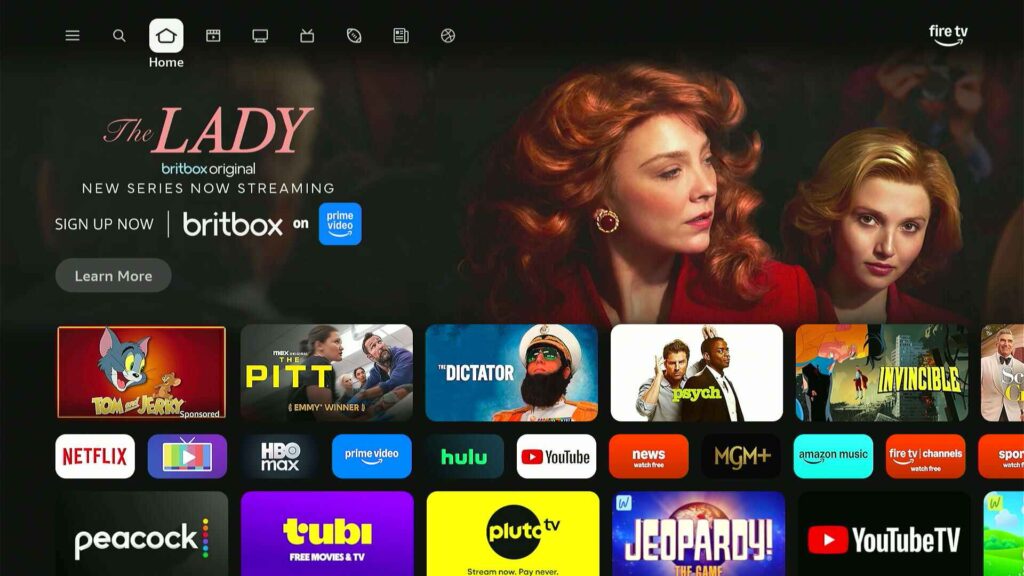
If your Fire TV home screen suddenly looks different, you’re not alone.
Last month, Amazon started rolling out its biggest Fire TV update in years, with rounder icons and some big navigation changes. While the launch has been gradual, it seems to have picked up speed this past week based on what I’m hearing from readers and seeing on my own devices.
The new home screen is arriving first on the latest Fire TV Stick 4K Plus and 4K Max streaming players, along with Amazon’s Fire TV Omni Mini-LED TVs. Support for more streaming players and TVs is coming this spring.
While the new home screen is an improvement overall, it’s also in some ways a step backwards. Either way, it takes some getting used to, as a lot of features have changed, moved, or disappeared.
Weekly rewind
Netflix price hike: Doesn’t it feel like Netflix just raised prices? Now it’s raising them again for all plans, 14 months after its last round of hikes:
- Basic with ads: $8 → $9/mo.
- Standard (two streams, no ads): $18 → $20/mo.
- Premium (four streams, 4K): $25 → $27/mo.
- Extra member fee (with ads): $6 → $7/mo.
- Extra member fee (no ads): $9 → $10/mo.
I keep thinking about this idea that Netflix is trying to become cable before cable becomes Netflix, a twist on what now-CEO Ted Sarandos once said about becoming HBO. It is trying to be that one service that satisfies a broad swath of entertainment needs, with all other services being secondary. As such, it keeps pushing prices higher and daring you to quit instead of cutting other subscriptions instead.
Howdy on Prime: Roku is expanding its $3 per month Howdy streaming service to more platforms by offering it as an add-on subscription through Amazon Prime Video. This effectively brings Howdy to any platform where the Prime Video app is available, including Google TV, Apple TV, and Amazon’s own Fire TV devices.
Oddly, the version of Howdy that Roku sells through its own Roku Channel app is not as widely available. You can’t access Roku Channel subscriptions through Roku’s Fire TV or Google TV apps, and there’s no Roku Channel app at all on Apple TV devices. By contrast, signing up for Howdy through Prime Video lets you access the subscription pretty much anywhere, including in the Prime Video app on Roku devices. Just another reminder that paying for TV is way too complicated.
(I’ve said before that Howdy is what Netflix used to be in its earliest years, and that analysis holds up.)
Peacock promo warning: Over the past week I’ve heard from a couple readers who received a comeback offer from Peacock via email, offering a year of the “Select” plan for $30. The email includes unique promo code that’s only redeemable once, so I can’t share it here.
But if you get this offer yourself, keep in mind that Peacock Select does not include live sports or Peacock Originals. It’s a much more limited plan than Peacock Premium, which costs $11 per month or $110 per year. You might still want Peacock Select for its NBC programming and back catalog, but be aware of what you’re getting before committing to a year of it.
A new way to watch YouTube: Over in my pal JR Raphael’s Cool Tools newsletter, I wrote about Channel Surfer, a fun new website that stuffs a bunch of YouTube videos into a cable-style grid guide. There are dozens of channels to choose from, around themes like food, travel, and music, and you can also import your YouTube subscriptions into channels of their own. Check out Channel Surfer yourself, or read my write-up for more details.
More catch-up
- Nice new Roku feature: While viewing the Live Guide, use your remote’s Replay button (the one with the circular spinning arrow) to flip between your last-viewed channels.
- Google TV gets the Gemini AI features it announced back in January. (Read my earlier coverage here.)
- The tvOS 26.4 update is out for Apple TV boxes, with customizable subtitle styles and a “Genius Browse” feature that recommends new things to watch.
- Scripps’ new sports channel on free streaming services actually includes live sports. (Most free sports streaming channels don’t.)
- Hulu + Live TV adds Marquee Sports Network in the Chicago area at no extra charge.
- Reminder that I’ve got a guide to baseball streaming for the 2026 season here.
Save more money
This part of the newsletter has some affiliate links, which earn me a commission if you wind up buying or subscribing to something.
If you’re a T-Mobile or Metro customer, this is your week to claim an entire free season of MLB.TV. To redeem the offer, look under the Benefits tab in the T-Life app (for T-Mobile customers) or the Tuesdays tab in the myMetro app (for Metro customers). The offer expires on Monday, March 30.
Some things to keep in mind:
- Unlike the regular MLB.TV subscription, T-Mobile’s version does not include a live stream of MLB Network. (T-Mobile customers who want MLB network can pay separately for MLB+ instead.)
- Also unlike the regular MLB.TV subscription, you don’t need ESPN Unlimited to redeem T-Mobile’s offer.
- MLB.TV only covers out-of-market games, and there’s no discount for bundling MLB’s in-market streaming services with T-Mobile’s offer.
Other notable deals:
- Last chance to get two months of Paramount+ Premium for $3 per month. Also available via Amazon Prime. (New and returning subscribers only, ends March 31.)
- But returning subscribers should still try signing up with promo code BG2L7M instead. That’ll get you two months for $1 per month.
- YouTube TV’s new Sports package: Still $55 per month for the first year.
- Fire TV Stick HD for $17 (new low), Fire TV Stick 4K Plus for $22 with code SAVE254K, Fire TV Stick 4K Max for $30 with code MAX4KFTV.
As always, my full list of up-to-date streaming deals is available here.
More tech advice from me
This week in my Advisorator newsletter, I wrote a great Google Chrome alternative that I’m nonetheless conflicted about, Microsoft’s plan to fix Windows, and how to put baseball on your digital calendar.
- Read the free edition of the newsletter.
- Sign up to get free tech advice from me every Tuesday.
- Become a paying member to get the full newsletter, online tech guides, access to my members-only discussion forum, and more.
Thanks for reading!
That’s all for now. Remember that Cord Cutter Weekly will be off next week, back on April 10.
Until then,
Jared