Note: I’ve made this guide available with no ads or sponsors under a pay-what-you-can honor system. If someone shared this page with you, please consider purchasing a copy to support the work that went into creating this resource.
Now that you’ve grasped the basics, it’s time to make your first big decision: Should you pay for a live TV streaming service?
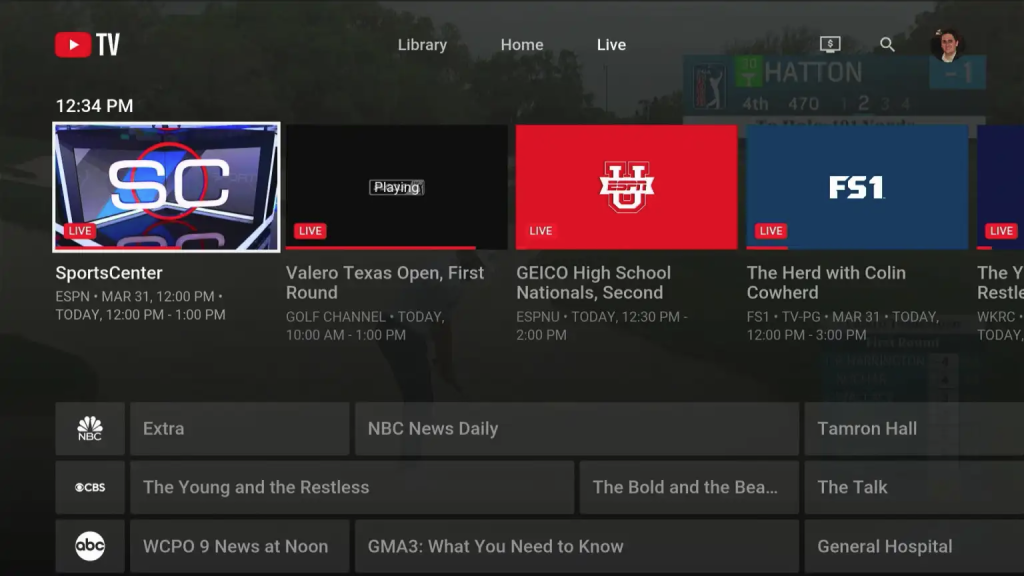
These services—also known colloquially as cable replacements or as vMVPDs in industry jargon—aim to replicate the cable experience in a few key ways:
You’ll get a big bundle of live TV channels.
Cloud-based DVR is included, so you can record shows and skip through commercials.
Grid-based channel guides let you quickly see what’s on live TV.
A couple years ago, these packages were required to access certain kinds of programming, particularly cable news and sports. That’s no longer the case, so you may be able to avoid these bundles entirely. (More on that in the next section.)
But depending on how many live channels you need—particularly for news, sports, and local stations—a bundle may be more economical. Some of these packages even include access to streaming services at no extra charge.
The big bundles
These services are the closest equivalent to what you already have with cable. They’re expensive, starting at $83 per month for YouTube TV’s base plan, but offer broad selections of local stations, sports, news, entertainment, and children’s programming.
Pros: Easy to navigate, broad channel selection, unlimited DVR, multiview.
Cons: Series recordings are all-or-nothing, so you can’t record or delete individual episodes or mark them as watched. The Library menu makes DVR recordings tough to distinguish from on-demand videos (which have unskippable ads).
DVR: Store unlimited recordings for up to nine months.
Viewing restrictions: Watch on three devices at a time. You must watch from your home address at least once every three months.
Notable missing channels: No A&E or MLB Network, no regional sports except NBC Sports.
Pros: Well-designed apps, full multiview on Apple TV and newer Rokus
Cons: No visual preview while fast forwarding on Android TV and Fire TV
DVR: Store unlimited recordings for up to nine months
Notable missing channels: No NBC, TNT, TBS, or CNN
Viewing restrictions: Can’t watch on TV at home and out-of-home simultaneously
Sports bundles
These packages focus on live sports and local channels, with cable news included in some cases. Entertainment channels are omitted to bring the price down.
YouTube TV Sports ($65/mo.) or Sports + News ($72/mo.):Same features as YouTube TV’s base plan, but with just local stations and national sports channels (plus regional NBC Sports in select markets). Sports + News package adds cable news and business channels.
Notable missing sports channels: MLB Network, NHL TV, Tennis Channel, most regional sports networks
DirecTV MySports ($70/mo.):Same features as DirecTV’s standard plans, but with just local stations, national sports (plus regional NBC Sports in select markets), and cable news channels. Regional sports available in select markets for $20/mo. extra.
Notable missing sports channels: Tennis Channel
Fubo Sports and News ($56/mo.):Same features as Fubo Pro, but with just local stations, national sports, and national news (plus regional NBC Sports in select markets). Regional sports available in select markets for $20/mo. extra.
Notable missing sports channels: NBC, TNT, TBS, Tennis Channel, USA, Golf Channel. No regional sports.
Skinnier bundles
These packages are smaller than standard live TV streaming packages, but still offer some level of news and sports coverage. They could be a good fit depending on your needs.
YouTube TV Entertainment Plan ($55/mo.):Same features as YouTube TV’s standard plan, but with just local channels and general entertainment channels such as Hallmark and Bravo. No cable news or sports channels.
DirecTV MyNews ($40/mo.):Same features as DirecTV’s standard plan, but with just local channels and cable news networks. Despite the name, it’s actually the cheapest way to get local broadcast channels without an antenna.
Sling TV Orange ($46/mo.):ESPN, CNN, TNT, and a mix of entertainment channels, but no local channels or other cable news networks. This only makes sense with very specific channel needs. Can be combined with Sling Blue for $61/mo.
Sling TV Blue ($46/mo):CNN, MS Now, Fox News, and TNT, plus a mix of entertainment channels. ABC, Fox, and NBC available in select markets. This raises the price by $5/mo. in markets with at least one local channel, and by $9/mo. in markets with all three. Can be combined with Sling Orange for $61/mo.
Sling TV Select ($20/mo):FS1, Fox News, NFL Network, and a handful of entertainment channels. ABC, Fox, and NBC available in select markets. This raises the price by $5/mo. in markets with at least one local channel, and by $10/mo. in markets with all three. Local channels make this bundle a lot more interesting.
Pros: Could cater to specific channel needs.
Cons: Limited frame rates on some channels, basic DVR requires routine storage management, add-on packages can get confusing.
DVR: 50 recording hours saved up to nine months. $5/mo. extra for unlimited recording saved up to nine months.
Sports-free bundles
Sports and local channels are the most expensive parts of a pay TV package. These packages cut those elements out to bring prices down.
DirecTV MyEntertainment ($40/mo.):Includes Disney+, Hulu, HBO Max, major cable news networks, and a bunch of entertainment channels—no locals or sports. Same features as DirecTV’s standard plan.
DirecTV MyKids ($20/mo):Includes Disney+ along with a selection of kids and family channels, such as Nickelodeon and Cartoon Network. Same features as DirecTV’s standard plan.
Philo ($33/mo): Includes HBO Max, AMC+, Discovery+, and a mix of entertainment channels—no news, sports, or locals.
Pros: DVR helpfully marks up ads so you can skip them, has nice integrations with streaming platforms.
Cons: Bundled streaming services make it more expensive than it used to be, unusual channel guide.
DVR: Unlimited recordings for up to three months, or for nine months with $13/mo Premium plan.
Pros: Helpful 72-hour lookback for all channels, no out-of-home viewing restricitons.
Cons: Base plan lacks DVR and only does 480p video.
Get help choosing
The Streamable’s Matchmaker can help you quickly narrow down the options.
Comparing the channel lineups for all the above live TV streaming services can be daunting. Instead, I suggest making a list of your must-have channels, then using a few comparison tools to narrow down the options:
The Streamable’s Matchmaker tool lets you pick the channels you care about and get a list of live TV services that match. It’s easy to use, but omits Frndly TV from its results.
MyBundle.tv compares live TV streaming options based on your channel preferences, but also suggests some cheaper alternatives if you’re willing to make some sacrifices. But strictly for comparing live TV streaming options, it’s more prescriptive and less thorough than the above tools.
Frequently-asked questions
How does DVR work?
Some services let you record unlimited programs and keep them for a certain time period, while others put a cap on recording hours with no time limits. All of them let you skip through ads.
Do I have to pay extra for each TV?
Nope. Most services let you watch on multiple TV simultaneously, though the exact number varies by service. There’s no limit on how many total devices you can connect.
If you’re willing to make some more drastic changes to your TV setup, you can abandon pay TV bundles and rely entirely on less expensive subscriptions and free streaming services. Head to the next section for an overview of those options.