


Note: I’ve made this guide available with no ads or sponsors under a pay-what-you-can honor system. If someone shared this page with you, please consider purchasing a copy to support the work that went into creating this resource.
Congrats on taking the first step toward cutting cable or satellite TV, which is to figure out how it works, what exactly you need, and whether you should even be doing it in the first place.
This initial guide will answer all those basic questions, along with plenty of others that I’ve received over the last decade as a tech journalist covering this field. Let’s start with the most essential question of them all:
Should I cut the cord?
Cord-cutting is not the best option for everyone. Before you go down this path, here are some reasons why you might stick with cable or satellite TV:
- You’re getting a great promo deal: If your combined TV and home internet bill is less than $150 per month, cord-cutting probably won’t save much money without big changes in what you watch. (On average, though, TV alone costs well over $100 per month, leaving plenty of room to save.)
- You don’t have home internet service: More on this shortly, but adding home internet just for streaming TV will eat further into your potential savings. Cord-cutting works best for folks who have internet and Wi-Fi at home already.
- You’re inflexible: This is the big one. To cut the cord, you must be comfortable using new technology that is in many ways different from cable. You might also want to give up certain cable channels, sporting events, or TV shows to maximize your savings. The more you’re willing to adapt, the better time you’ll have and the more money you’ll save.
If you’re not ready, consider trading in some of your cable boxes and using your TV provider’s streaming apps, if available. That way you can get used to streaming and ease into making a full cut down the road.
Cord-cutting: The basics
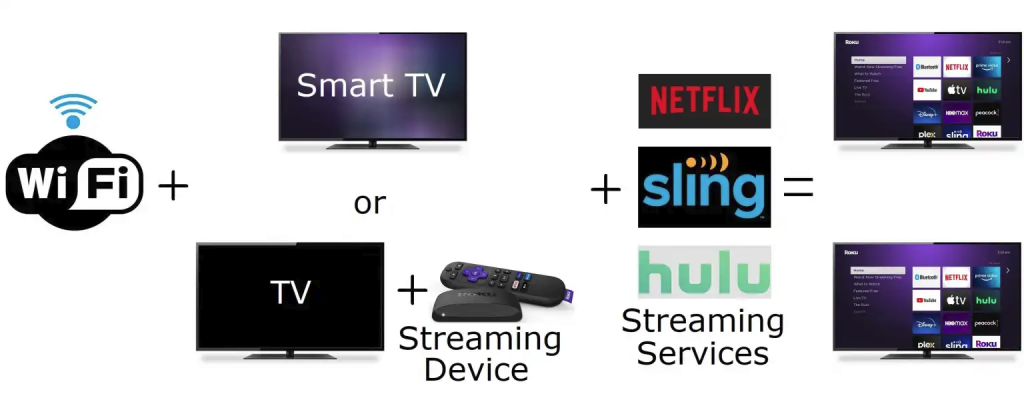
Still on board? Here are the basic ingredients for cutting the cord:
- Streaming services: To replace your TV service, you will subscribe to one or more online video services. These can include on-demand video services such as Netflix, a bundle of live TV channels such as YouTube TV or Sling TV, or free streaming services such as Pluto TV and Tubi.
- A smart TV or streaming device: Once you’ve selected some streaming services, you’ll use a smart TV or streaming device to access them, similar to how you’d download apps on a smartphone. Most new televisions have smart TV software built in, but you can also buy a separate device, such as Roku Streaming Stick or Fire TV Stick, that plugs into any modern television.
- Home internet service: You’ll need an internet connection to watch streaming services through your TV, with required connection speeds ranging from 5- and 20Mbps (megabits per second), depending on video quality. Multiply that by the number of TVs you expect to use at the same time for a rough measure of how fast your internet connection should be for streaming. Yes, that means download speeds of 100Mbps should be more than sufficient on a strong Wi-Fi network. Cable providers might try to upsell you on faster speeds—especially when you threaten to cut out TV service—but you don’t need them.
- An antenna (optional): You don’t need an over-the-air antenna to cut the cord, but it can be helpful for watching local broadcast channels—ABC, CBS, NBC, Fox, CW, and PBS—without an expensive pay TV package.
Frequently-asked questions
Do I need a smart TV to cut the cord?
No. In the same way that you can switch over to your cable box input, you can flip to an external streaming device that plugs into your TV’s HDMI port. This will give you similar (or sometimes better) capabilities than a smart TV.
I already have a smart TV. Do I need a separate streaming device?
Only if your TV’s software is unbearably slow or doesn’t support the streaming services you want to use. I suggest trying your smart TV system first, then considering an external streaming player if you’re unsatisfied.
I have multiple TVs. Do I need more than one streaming device?
Each TV must have its own way to stream, whether that’s through its built-in smart TV software or through a separate streaming device.
For instance, if you have four TVs, and only two of them have up-to-date smart TV software, you’ll need to buy a pair of streaming devices for the other two televisions.
Do I need separate subscriptions for each TV?
No. Most streaming services allow you to watch on two or three devices at the same time, and have no limit on the total number of TVs, phones, computers, and other devices you can connect. For most folks, a single subscription should cover all of your devices.
Do I have to pay equipment fees for my smart TV or streaming device?
Smart TVs and streaming devices have no ongoing equipment rental fees and no activation fees. Once you’ve purchased the hardware, it’s yours.
The only ongoing subscriptions are for the video services you decide to pay for, such as Netflix or Hulu.
Does my TV need Wi-Fi?
All modern smart TVs can connect to Wi-Fi, with no need for a wired ethernet connection.
If you’re using an external streaming player, that device will have its own Wi-Fi connection, separate from your TV, so you can connect even if your TV itself lacks Wi-Fi.
Can I use wired internet?
Yes, assuming your TV or streaming device has an ethernet port and you can physically run an ethernet cable from your router. With recent improvements in wireless routers—including the rise of affordable mesh systems—most cord-cutters will have an easier time sticking to Wi-Fi.
How can I check my TV speeds?
Try visiting speedtest.net on a phone or computer, both near your router and your televisions. If speeds don’t come close to what you’re paying for, try some troubleshooting steps or consider a new router.
Can I just use my smartphone’s hotspot for internet?
Probably not, as most wireless carriers have hotspot data caps that severely limit how much TV you can watch.
Next up: Understanding your streaming options
Coming up next on the complete guide to cord cutting, we’ll go over different kinds of streaming services and how to make sense of them all.