
Hey there! I’m Jared Newman, and this is Cord Cutter Weekly, my newsletter on how to save money on TV and make the most of streaming. Sign up here if someone shared this newsletter with you.
Make Google TV look like Apple TV
 Jared Newman |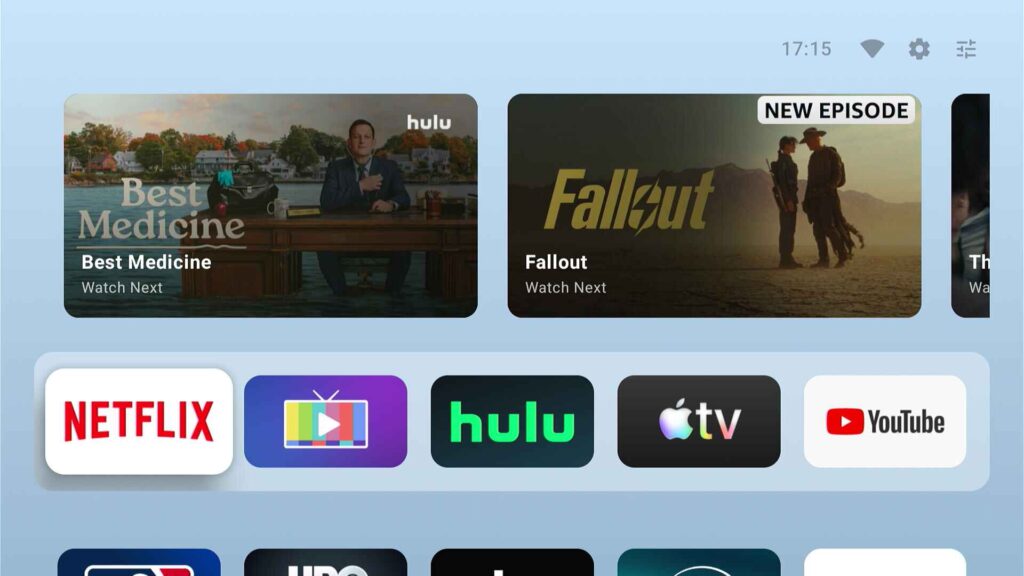
Like many other streaming platforms, Google TV is gradually getting harder to tolerate.
Finding something to watch requires wading through all kinds of ads and upsells, from the sponsored listings at the top of the home screen to multiple rows touting movies and shows for purchase. Those money-grabs detract from what used to be one of the more useful streaming TV home screens.
A new app called AT4K Launcher offers a solution, with an alternative launcher that shamelessly borrows from the Apple TV interface. With a few minutes of setup, you can remove the ads from Google TV’s home screen and get a much simpler menu for apps. If you have a Google TV smart television (from brands like TCL, Hisense, and Sony) or a Google TV streaming player (like the excellent Walmart Onn 4K Plus), this free app is at least worth a look.
Everything I know about ad blockers
As a reminder, I’m running a New Year’s sale on Advisorator memberships, so you can get your first year for $37.50, which is 25% off the regular price. If you like what I’m doing with Cord Cutter Weekly, Advisorator brings the same approach to the wider tech world.
This week, for instance, I wrote a big guide to ad blockers. While an ad blocker can be a great way to make your web browsing experience cleaner and faster, it also comes with some compromises, and installing the wrong one can be detrimental or even dangerous. With this guide, you’ll learn how to set up an ad blocker, avoid some common pitfalls, and get the most out of it.
My goal with these guides is to provide straightforward, actionable tech advice that anyone can follow, and I plan to publish more of them for Advisorator members in 2026. If you’re not aboard yet, you can sign up this week for 25% off your first year.
Weekly rewind
T-Mobile’s streaming perk plan: T-Mobile is pushing a new wireless plan for families that bundles Netflix and Hulu, along with a $10 monthly credit toward Apple TV. The “Better Value” plan costs $140 per month for three lines (and $30 per month for additional lines), and is actually better than T-Mobile’s Experience More plan for the same price. It offers more hotspot data (250 GB) and more overseas data (30 GB), and it includes Hulu, which Experience More does not.
The only catch is that T-Mobile reportedly isn’t letting existing customers switch unless they’ve been with the carrier for five years. (At the risk of hammering the Advisorator thing too aggressively, I do have a guide for members that sorts through all these data plans.)
Roku’s new menu section: Roku has started rolling out a “Subscriptions” section on its home screen, pulling in content from the services you’re already paying for. There’s a “Popular From Your Subscriptions” section up top, for instance, along with another iteration of Roku’s “Continue Watching” row, which helps you resume movies and shows in progress.
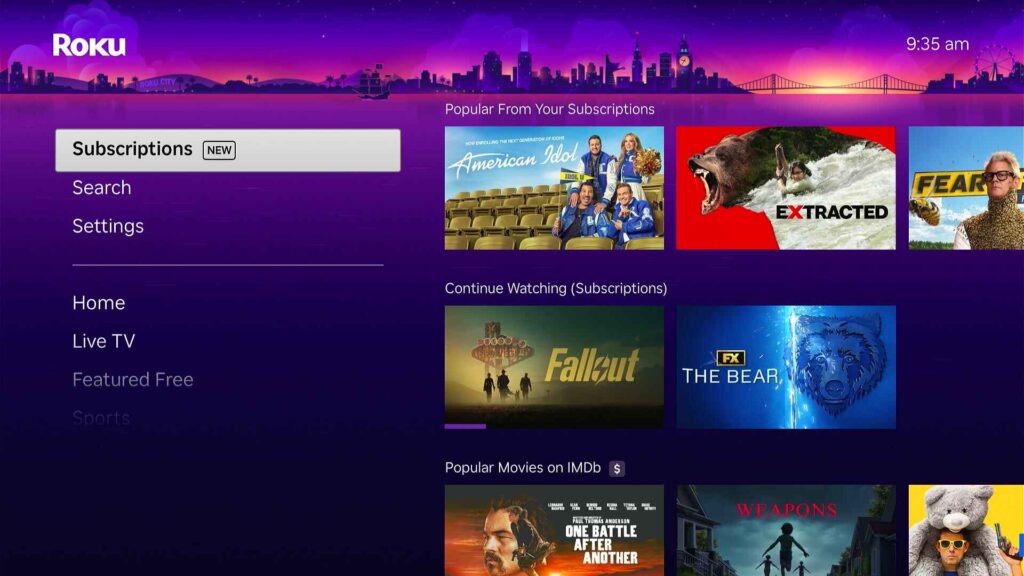
Of course, this is Roku, so there’s some upselling as well. If you don’t have enough subscriptions, or you keep scrolling down in this menu, you’ll start seeing suggestions for new services to pay for, in line with Roku’s recent goal to boost subscription revenue. This new section still seems net positive to me, but you can always hide it by heading to Settings > Home Screen > Subscriptions and selecting “Hide.”
More catch-up
- Peacock will carry the Olympics and the Super Bowl in 4K on February 8.
- But Comcast says its Super Bowl cable feed will have the lowest latency.
- YouTube TV’s DVR starts labeling specific segments in news shows so you can skip to them more easily.
- Classic Looney Tunes cartoons will land on TCM after HBO Max dropped them.
- Amazon’s Fire TV Blaster, which relayed Alexa voice commands to an IR emitter for TV controls, will stop working at the end of this month.
- ADTH’s ATSC 3.0 boxes mysteriously stop working due to DRM issues, though a fix is coming.
Save more money
This section of the newsletter has some affiliate links, which earn me a commission if you wind up buying or subscribing to something.
Free Apple TV is back after a brief absence. New and “qualified” returning subscribers can use this link to get 30 days at no charge. If it’s like the previous iteration, you should be able to cancel immediately after signing up to avoid getting auto-billed at the end.
In the past, I’ve found that multiple members of an Apple Family Sharing group can redeem these freebies and give access to the entire group, so if the link doesn’t work for you, see if someone else in your family can use it. I’m still in the middle of a different free promo period and can’t test this myself yet, so let me know if it works for you. (Thanks for the tip, Bill C.!)
Other notable deals:
- Refurbished Apple TV 4K boxes are now available for $20 less than buying new.
- Still works+: Two months of Paramount+ Premium for $1 per month with promo code BG2L7M. Select former subscribers only; won’t work for new or current subscribers.
- DirecTV’s MyEntertainment and MyNews genre pack bundle is on sale for $65 per month for two months (saves $10). Includes Disney+, Hulu, HBO Max, and local channels in select markets.
For a full list of streaming deals, see this page on my website.
Thanks for reading!
One more little note that you can get 25% off your first year of Advisorator this week. I’ll send you my tech advice newsletter on Tuesdays, and you’ll unlock helpful guides on topics like using an ad blocker, how to stop spam, how to actually use a password manager, and the right way to lock down your accounts.
Okay, that’s the spiel. Got cord cutting questions for me? Just reply to this email to get in touch.
Until next week,
Jared