


Note: I’ve made this guide available with no ads or sponsors under a pay-what-you-can honor system. If someone shared this page with you, please consider purchasing a copy to support the work that went into creating this resource.
Now that you’ve picked your streaming services and worked through your over-the-air TV options, it’s time to pick a smart TV or streaming device on which to do your watching. Let’s walk through all the potential options so you can choose what’s best for you.
Smart TV or streaming player?
While smart TVs once had a terrible reputation for sluggish performance and limited app selections, TV makers have realized that offering a decent experience actually helps them make more money through stronger sales, advertising, and subscription revenue. If you’ve purchased a new TV in the past five years or so, its built-in software might be just fine.
Still, there are a handful of reasons to consider a separate streaming device instead:
- The TV’s app selection is lacking: Samsung, LG, and Vizio generally support fewer apps on their smart TV systems compared to other platforms. If the apps you want aren’t available on your TV, you’ll likely want a separate device.
- It’s no longer getting software updates: TV makers often leave their old hardware behind after several years, at which app support can further degrade.
- You’re noticing performance issues: If you’re dealing with long load times or laggy remote responsiveness, it’s probably time for a new streaming device with better performance.
- The Wi-Fi is weak: If your TV is especially old, it may be using an outdated Wi-Fi standard. Assuming you’ve ruled out any issues with your Wi-Fi router, a newer streaming device may bring better connectivity.
- You crave consistency: Running the same streaming platform on each TV means you’ll have a similar experience regardless of which screen you’re using. Plugging external players into your TVs will be a lot cheaper than replacing the TVs themselves.
With all of the above cases, an external streaming device will effectively replace your TV’s built-in software. Plug it into your TV’s HDMI port, then switch inputs on your TV, and you’ll instantly get a better streaming experience. You can even take steps to load the correct input when you turn on the TV, bypassing the smart TV software entirely.
Streaming platforms at a glance
The best way to think about streaming devices is by platform, as Roku, Fire TV, Google TV, and Apple TV all offer distinct experiences and features. Here’s a quick overview of each one:
Roku: The simpler option
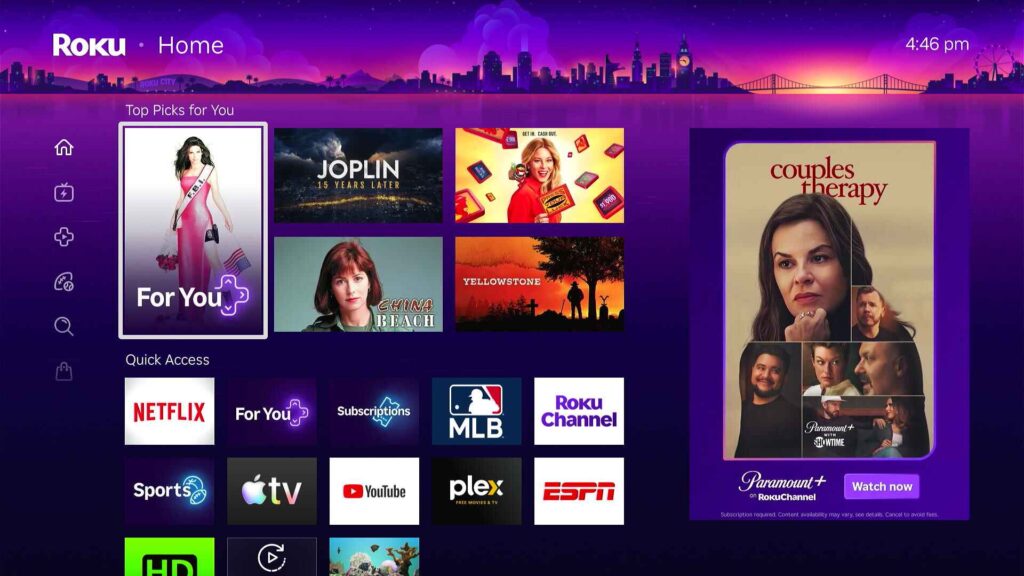
Compared to other streaming platforms, Roku’s home screen is the least overwhelming. Finding the icons for your favorite apps is fairly easy, and you’ll find a lot of free content without much clicking around.
That said, the interface has gotten more crowded with banner ads and promotional content, especially after a major update in early 2026. It’ll take a few settings tweaks to restore the home screen to its hallmark simplicity.
One other caveat: Unlike other platforms, Roku’s remotes cannot control external soundbars and A/V systems over infrared. Unless your system supports HDMI-CEC, you’ll need a separate remote for volume control.
Apple TV: The fancy option

Apple’s streaming platform is the classiest of the bunch, with smooth performance, an aluminum-clad remote, and no ads on its home screen. Its devices are the most powerful you can get, and I like the “TV” app that lets you pick up where you left off on movies and shows.
You’ll pay a premium for that experience, though, as an Apple TV 4K costs $199.
Google TV: A content-first streamer
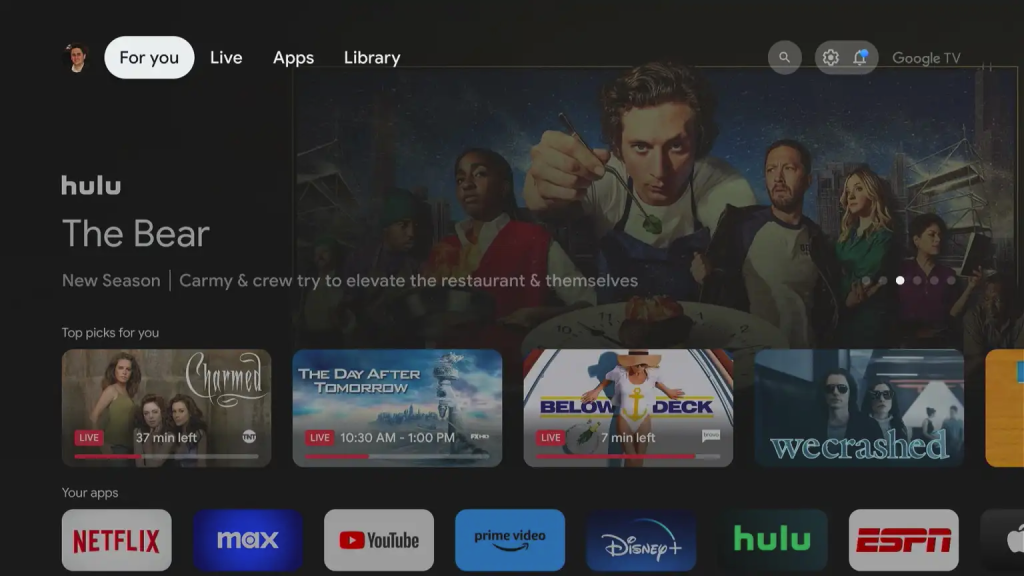
Whereas Roku’s platform is more app-centric, Google TV is more focused on content. The home screen is filled with movies and shows to watch, along with a “Continue Watching” row that ties into several popular streaming services. It’s a more forward-thinking take on streaming, but it’s not for everyone.
Also, note that Google has largely left Walmart in charge of selling Google TV streaming players in the United States. These have a tendency to drop in and out of stock without explanation, so the buying process can be frustrating.
Fire TV: Cheap, but chaotic
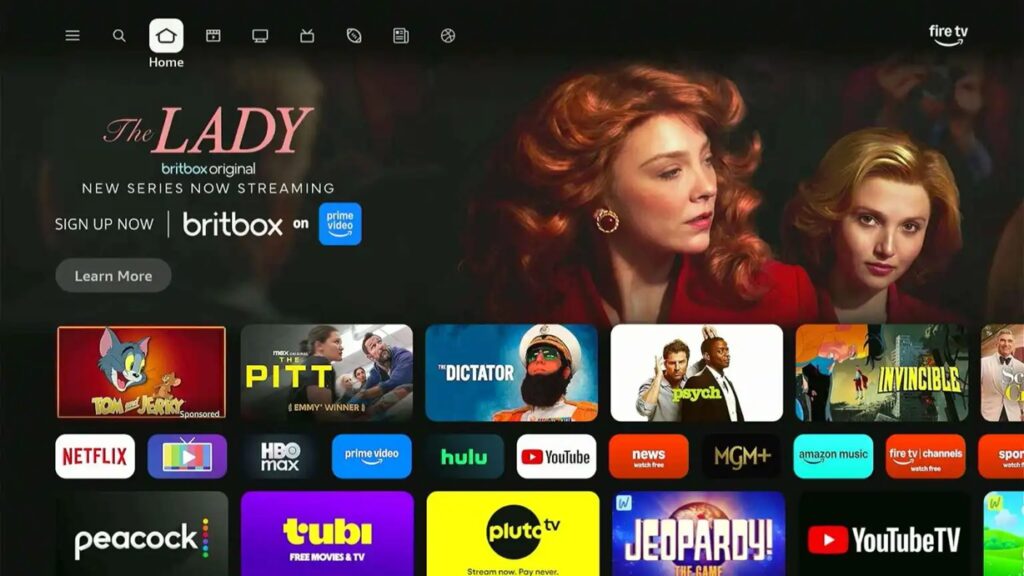
Amazon’s streaming platform is the same bucket as Google TV, in that it puts content front-and-center when you turn it on. The execution isn’t as successful, though, due to the amount of advertising and self-promotional content smeared across the platform. You’ll even see banner ads in screensaver mode on most devices.
That said, Fire TV devices frequently go on sale and undercut other streaming options, so they’re enticing if you can overlook some interface annoyances.
Almost there …
By now, you should have a full cord cutting plan in place, including all the streaming services you’ll use, an optional antenna setup, and the smart TV or streaming box on which you’ll watch everything.
In the final section of this guide, we’ll put it all together and plan the next steps.