

Note: I’ve made this guide available with no ads or sponsors under a pay-what-you-can honor system. If someone shared this page with you, please consider purchasing a copy to support the work that went into creating this resource.
Switching internet providers isn’t an essential element of cord cutting, and I don’t recommend doing it until you’re settled into your new streaming routine.
But once cable TV has faded into the rear view, you can yield additional savings by shopping around for internet as well. With the rise of 5G home internet from the likes of T-Mobile and Verizon, along with increasing fiber investment from companies like AT&T and Frontier, your options may not be as scarce as they used to be.
Here’s how to evaluate your options and pick the best internet service for your needs:
Get a list of options
Home internet options can vary drastically by city, or even by neighborhood, so your first step should be to figure out what’s available where you live.
Of all the websites for looking up home internet options in your area, I’ve found AllConnect to be the most useful. Type in your address, and you’ll get a list of providers along with their advertised download speeds and introductory rates. Clicking “View Details” for any provider will show the type of connection, advertised upload speeds, and any data caps that apply.
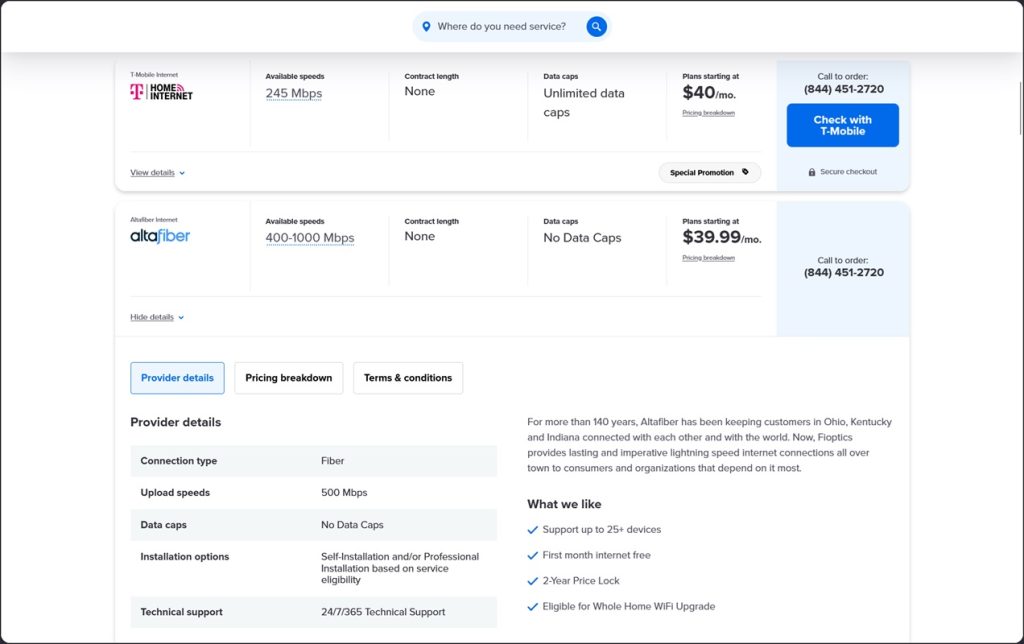
AllConnect’s results aren’t entirely accurate, though. While it correctly avoided listing Verizon’s 5G home internet service at my address, it also falsely listed Mediacom as an option and failed to list Starlink. You can search on BroadbandNow or the FCC’s broadband map for a second opinion, by they have their own blind spots, so you’ll ultimately need to treat the results as a starting point for additional research.
Know your internet types
When looking through your options, it’s helpful to know what kind of internet service they’re offering. Here’s a rough breakdown, from best to worst in terms of service quality:
- Fiber (best): Fast and reliable, usually with equal upload and download speeds. Examples: Verizon Fios, AT&T Fiber, and Frontier.
- Cable (better): Fast and reliable, but usually with slower upload speeds. Examples: Comcast Xfinity, Charter Spectrum
- Fixed wireless (good): Fairly speedy if 5G is available, but may be less reliable than wired internet. Examples: T-Mobile Home Internet, Verizon Home Internet
- DSL (meh): Slower than the above options, and likely less reliable.
- Satellite (ugh): Slow and subject to data caps. Best avoided if possible. (Starlink is an exception, but it’s expensive.) Examples: Viasat, Hughesnet
Note that I’m not yet factoring price into the equation. We’ll get to that in the next step.
Dig into the details
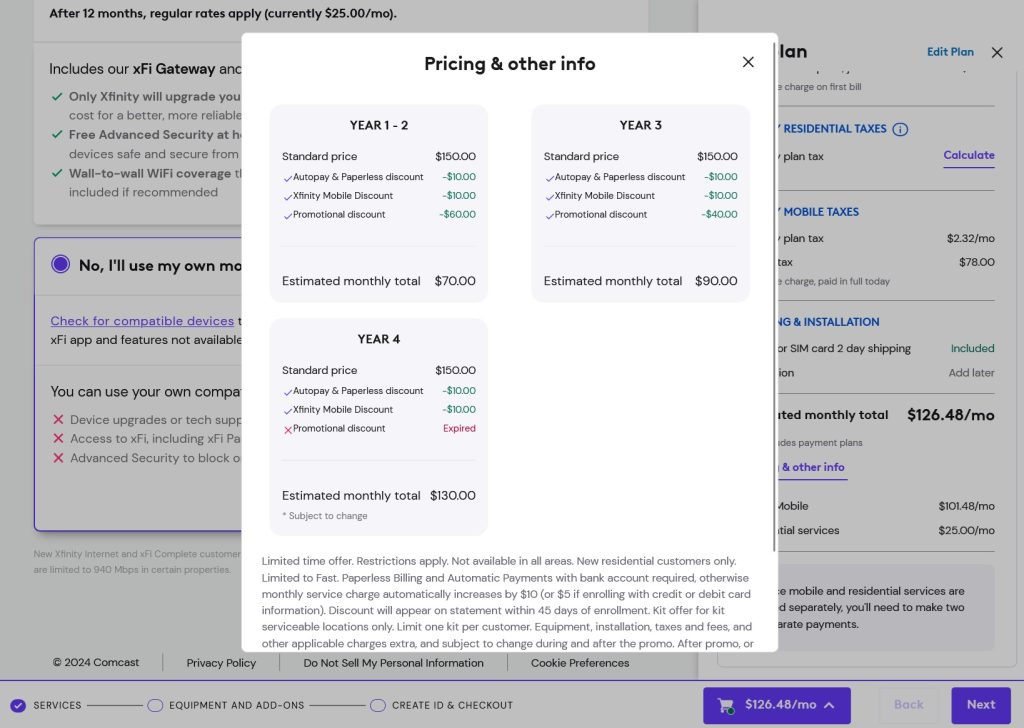
Now that you have a list of prospective internet providers, it’s time to figure out what they’re actually offering. This can be a challenge unto itself, as some providers avoid providing transparent pricing info up front.
To get the real details, pretend you’re actually signing up. That means visiting the provider’s website, plugging in your address, and poking around in the fine print as you move through the checkout process.
Here’s what you’ll need to find out:
- The real price: Even if you get a promo rate, you should know what the regular price will be, and when. Comcast, for instance, advertised a price of $25 per month for its cheapest internet plan in my research, but a little digging showed that the price jumps to $45 per month in year two and $80 per month after that.
- Contracts: Some providers only offer their best rates in exchange for a minimum service period. Be clear on what you’re signing up for and make sure you’re not agreeing to a contract by accident.
- Data caps: While some providers have no data caps, others enforce them in certain markets, or have varying caps based on connection speed. They’re best avoided if possible, but here’s a rule of thumb if you can’t: For each hour of high-definition video streaming, expect to use about 3 GB (or 0.003 TB) of data. (Data caps are also the main reason it’s hard to use your phone’s hotspot for home internet.)
- Upload speeds: With the exception of fiber, many internet providers try to hide their upload speeds from shoppers, as they tend to be much slower than download speeds. Make sure to get this info before you sign up.
- Equipment fees: If you’re not planning to bring your own modem and router, make sure to factor rental fees into the monthly rate.
- Setup fees: Verizon Fios, for instance, charges a $99 setup fee unless you sign up for gigabit service.
That’s a lot to take in, but the good news is that the FCC now requires major internet providers to display “nutrition labels” during the sign-up process, disclosing speeds, fees, data caps, and non-promotional pricing. Some providers are better at surfacing this information than others, so just keep an eye out for “Broadband Label” after you’ve entered your service address.
What speed do you need?
I’ve previously written about how gigabit internet is overkill in most cases, and that’s still true today. Netflix, for instance, recommends download speeds of 25 Mbps for 4K HDR video, so even a 100 Mbps connection would be sufficient for multiple streams.
You’re more likely to hit speed bumps on the upload side, especially with cable or fixed wireless service, but even then, a 10 Mbps connection should be enough to conduct multiple Zoom calls simultaneously. Buffering and other connection problems are usually symptoms of a weak router, not your internet plan, so don’t let sales reps push more than you actually need.
Factor in bundling
Extricating yourself from your current internet provider will be tougher if you’ve been bundling other services with it. Some factors to consider:
- TV: You’ll almost certainly save more money by ditching cable TV service in favor of streaming. I write a whole other newsletter about that, but this guide of mine over at TechHive is a good starting point.
- Mobile: Bundling home and mobile internet can save you money—discounts tend to range from $10 to $25 per month—but can also complicate the process of switching providers when prices inevitably rise. (See my guide to picking a wireless plan for more help on that front.)
- Landline: Going cellphone-only is worth considering in most cases, but internet-based phone services such as Ooma Telo can plug the gap if home phone is a must and your new provider doesn’t offer it.
Make the call
Once you’ve researched your internet options, it’s time to call your current provider and ask to cancel.
This is where things can get interesting, as cable providers such as Comcast have recently been feeling threatened by 5G and fiber. Compared to their TV businesses, internet service is much more profitable and is essentially to keeping their earnings afloat.
All of which means you might get a deep discount by threatening to walk, If you do, the research you’ve just done will be time well spent.